家里的软路由还在运行着几年前的 23.05,已经有些太旧了,趁着周末更新一下。
由于我的 OpenWRT 使用了一些第三方 package repository,所以我没法使用最傻瓜式的 attendedsysupgrade 。Gemini 推荐我用 imagebuilder 自定义一个新版镜像,首先需要去官方的镜像下载站下载新版本的 imagebuilder 包。
接着,解压得到的压缩包,并编辑其中的 repositories.conf 文件:
## Remote package repositories
src/gz openwrt_core https://mirrors.tuna.tsinghua.edu.cn/openwrt/releases/24.10.5/targets/x86/64/packages
src/gz openwrt_base https://mirrors.tuna.tsinghua.edu.cn/openwrt/releases/24.10.5/packages/x86_64/base
src/gz openwrt_kmods https://mirrors.tuna.tsinghua.edu.cn/openwrt/releases/24.10.5/targets/x86/64/kmods/6.6.119-1-484466e2719a743506c36b4bb2103582
src/gz openwrt_luci https://mirrors.tuna.tsinghua.edu.cn/openwrt/releases/24.10.5/packages/x86_64/luci
src/gz openwrt_packages https://mirrors.tuna.tsinghua.edu.cn/openwrt/releases/24.10.5/packages/x86_64/packages
src/gz openwrt_routing https://mirrors.tuna.tsinghua.edu.cn/openwrt/releases/24.10.5/packages/x86_64/routing
src/gz openwrt_telephony https://mirrors.tuna.tsinghua.edu.cn/openwrt/releases/24.10.5/packages/x86_64/telephony

# passwall2
src/gz passwall_luci https://master.dl.sourceforge.net/project/openwrt-passwall-build/releases/packages-24.10/x86_64/passwall_luci
src/gz passwall_packages https://master.dl.sourceforge.net/project/openwrt-passwall-build/releases/packages-24.10/x86_64/passwall_packages
src/gz passwall2 https://master.dl.sourceforge.net/project/openwrt-passwall-build/releases/packages-24.10/x86_64/passwall2

## This is the local package repository, do not remove!
src imagebuilder file:packages

#option check_signature我的修改主要是 1)替换软件源为清华大学镜像;2)添加 passwall2 相关的软件源;3)禁用了 signature 校验(不知为何,在构建过程中, passwall2 的软件源签名会出错)。
接着,还需要导出当前的 OpenWRT 中手动安装的软件列表,将其预置到自定义镜像中:
echo $(opkg list-installed | sed -e "s/\s.*$//") > packages.txt将 packages.txt 也保存到 imagebuilder 的目录下之后,运行下面的代码就可以构建镜像了:
cd ./path/to/openwrt-imagebuilder/
packages=$(<packages.txt)
make image PROFILE=generic PACKAGES="$packages" ROOTFS_PARTSIZE=1024稍等片刻,你就可以在 openwrt-imagebuilder/bin/targets/x86/64/openwrt-24.10.5-x86-64-generic-ext4-combined-efi.img.gz 下找的构建出来新镜像。
更新 OpenWRT
登录 OpenWRT 管理面板后,进入如下页面,并点击「更新固件」。
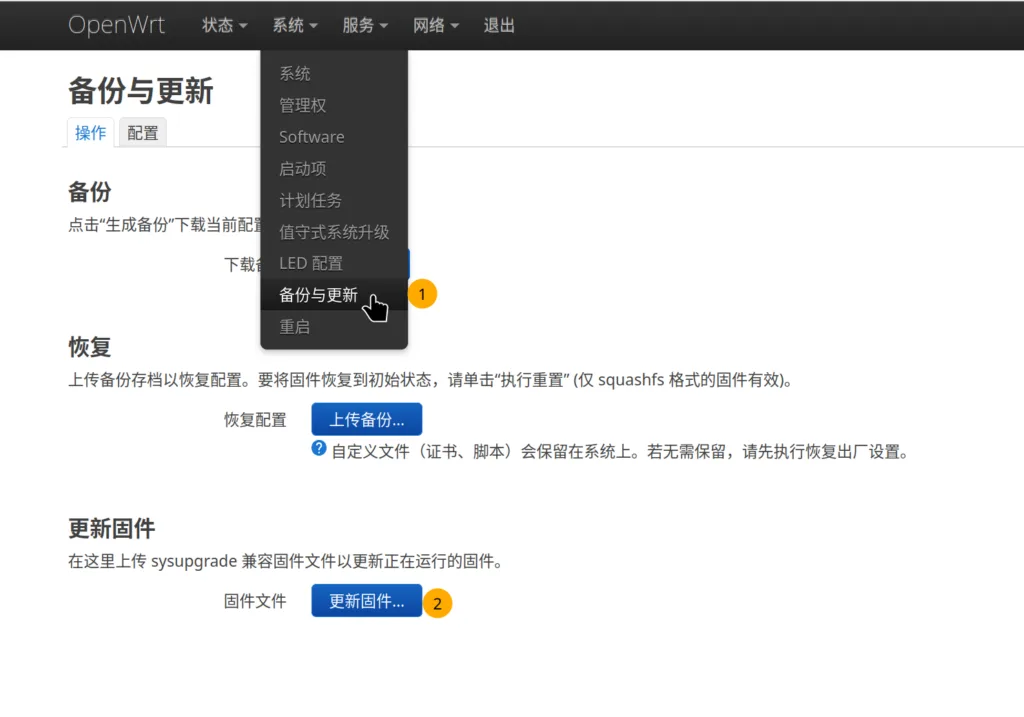
固件上传后,根据弹出框提示就可以开始更新固件的流程了。

发表回复